Home
Home  Navigation


MU Immortal marks the latest evolution in the storied MMORPG series, now tailored for mobile devices. Fans of MU Online will find themselves in familiar territory with classic features such as stat allocation, gear progression, and class-based gameplay. However, MU Immortal introduces contemporary enhancements like autoplay, offline farming, and a simplified approach to skill learning and management, making it more accessible to new players.
This guide aims to assist both newcomers and returning players in getting started with MU Immortal. Instead of diving into advanced strategies, we'll explore the fundamental gameplay systems to help you grasp how the game operates and set you on the right path. Whether your goal is to enjoy the game casually or to develop a robust character, here's everything you need to know to begin your journey.
Choosing Your Class
Your initial major decision in MU Immortal involves selecting a class. This choice significantly impacts your playstyle, stats, and the skills at your disposal. Each class offers a unique set of abilities and roles, so it's beneficial to understand these basics before making your selection.
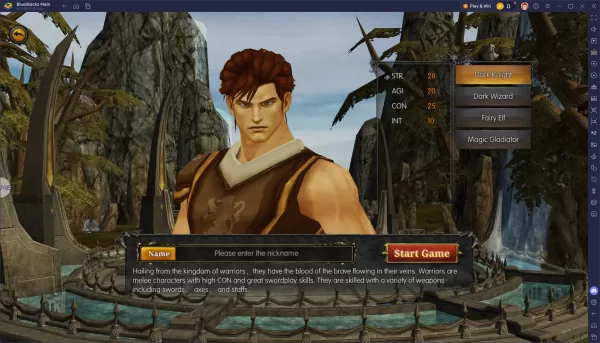
MU Immortal enhances the traditional grind-centric, stat-focused gameplay of MU Online with numerous quality-of-life updates such as autoplay, skill customization, and automatic gear management. While the game can almost run itself at times, proper setup requires some forethought. Choose a class that aligns with your preferred playstyle, carefully manage your stat distribution, and adjust your autoplay settings to optimize your farming strategy.
For an enhanced gaming experience, consider playing MU Immortal on your PC using BlueStacks. It provides superior controls, enhanced performance, and greater customization options compared to mobile devices. Whether you're focusing on leveling up or experimenting with new builds, BlueStacks streamlines your gameplay and makes every aspect more manageable.
 Latest Articles










 Latest Games